
Archive Log Files with Sitecore PowerShell Extensions
Originally published on michaellwest.blogspot.com
The other day I was talking to Mike Reynolds (@mike_i_reynolds) about his idea of a FileWatcher for the Sitecore CMS log files. That sounded like a great opportunity to use the Sitecore PowerShell Extensions module found on the Sitecore Marketplace.
The process can be broken down into these few steps:
- A scheduled task to run a script
- The script zips up the log files and saves to an archive folder
Below are the scripts to get the job done.
<#
    .SYNOPSIS
        Archives old log files int zip format to a separate archive directory.

    .NOTES
        Michael West
#>

<#
    Load the function Compress-Archive. The Get-Item command supports a dynamic parameter
    called ID whenever the Path parameter is specified. This basically runs the script first
    before continuing.
#>
Execute-Script -Item (Get-Item -ID "{22C47B26-223F-4D5A-B760-9BB3C711AF9E}" -Path master:\)

# The archive filename will closely resemble the format of the default logfile names.
$archiveName = "logs.$([datetime]::Now.ToString("yyyy-MM-dd.HHmmss"))"
$archiveDirectory = "$($SitecoreDataFolder)\archived\"
$logDirectory = "$($SitecoreDataFolder)logs\"

# The filter includes log files older than 14 days based on LastWriteTime.
$filter = {
    $date = [datetime]::Today.AddDays(-14)
    $_.LastWriteTime -lt $date
}

# Get all the log files that match the filter criteria. After zipping up remove the log files.
$logs = Get-ChildItem -Path $logDirectory | Where-Object -Filter $filter
if($logs) {
    $logs | Compress-Archive -Name $archiveName
    $logs | Remove-Item
}

# The filter includes archive files older than 30 days based on LastWriteTime.
$filter = {
    $date = [datetime]::Today.AddDays(-30)
    $_.LastWriteTime -lt $date
}

# Get all the archived files that match the filter criteria. Remove the old archives.
$archives = Get-ChildItem -Path $archiveDirectory | Where-Object -Filter $filter
if($archives) {
    $archives | Remove-Item
}
function Compress-Archive {
[CmdletBinding()]
param(
[Parameter(ValueFromPipeline=$true)]
[System.IO.DirectoryInfo[]]$Directory,
[Parameter(ValueFromPipeline=$true)]
[System.IO.FileInfo[]]$File,
[ValidateNotNullOrEmpty()]
[string]$Name = "archive",
[ValidateNotNullOrEmpty()]
[string]$OutputPath=("$($SitecoreDataFolder)\archived\")
)
begin {
Add-Type -AssemblyName System.IO.Compression
Add-Type -AssemblyName System.IO.Compression.FileSystem
$level = [System.IO.Compression.CompressionLevel]::Optimal
if($Name -notmatch "zip$") {
$Name += ".zip"
}
if(!(Test-Path -Path $OutputPath)) {
New-Item -Path $OutputPath -ItemType directory
}
$zipPath = (Join-Path -Path $OutputPath -ChildPath $Name)
if(Test-Path -Path $zipPath) {
Remove-Item -Path $zipPath
}
$zipFile = [System.IO.Compression.ZipFile]::Open($zipPath, [System.IO.Compression.ZipArchiveMode]::Create)
}
process {
if($File) {
[System.IO.Compression.ZipFileExtensions]::CreateEntryFromFile($zipFile, $File.FullName, $File.Name, $level) | Out-Null
}
}
end {
$zipFile.Dispose()
}
}I added the Compress-Archive script here: /sitecore/system/Modules/PowerShell/Script Library/Functions/Compress-Archive
I then added the Archive Logs script here: /sitecore/system/Modules/PowerShell/Script Library/Tasks/Archive Logs
Finally, I created the scheduled task using the PowerShellScriptCommand.
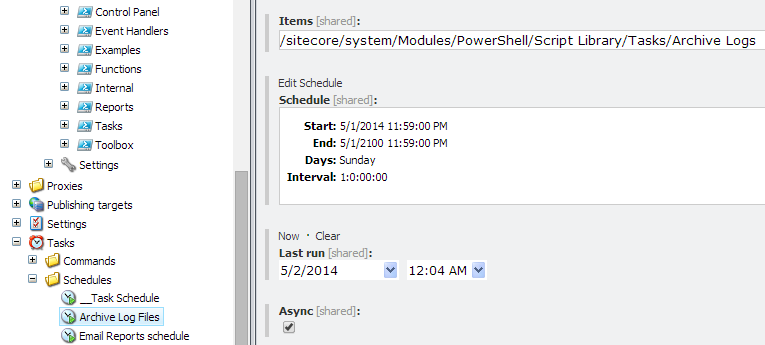
You’ll notice here that I’m using a custom field for the Task Scheduler so it’s easier to see what’s configured.
These scripts should be included in a future build of Sitecore PowerShell Extensions but feel free to start using now!