Replacement Task Scheduler for Sitecore
Originally published on michaellwest.blogspot.com
In this article we discuss some of the challenges with the out-of-the-box Task Scheduler included with Sitecore and see how you can replace it with Hangfire, a product to perform background processing for .Net applications.
Update: A NuGet package is available for download here.
There are a ton of articles describing the Task Scheduler and oftentimes they cover the same information. Oddly the only things I can find on the Sitecore docs site is from the old SDN.
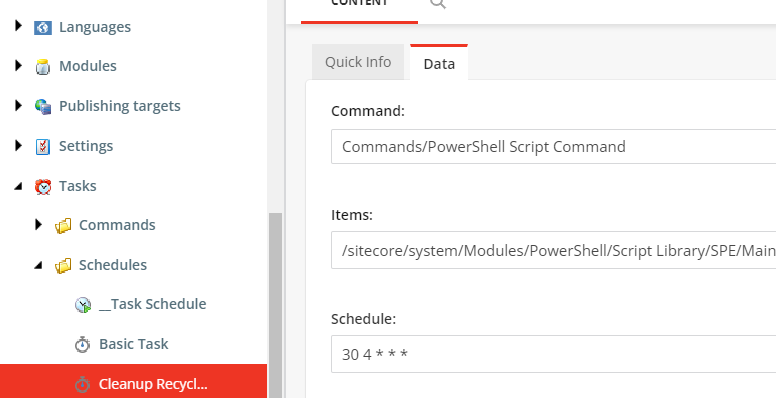
Some of the issues you’ll find with the Task Scheduler is the inability to run at a specific time and if Sitecore shuts down the missed tasks are likely to run immediately following startup. With the use of Hangfire we’ll address both issues. The format of the schedule field is also a bit crazy and so we’ll add to the complexity by including support for the cron format.
So why not SiteCron? You should use it. If however you can’t use it, don’t want to use it, or simply can’t make up your mind then feel free to give this a try.
Here is a quick breakdown of what we’ll build:
- Pipeline processor
- Configuration patch to disable the agent used for scheduled tasks and to register our new processor
Gist: gist.github.com/michaellwest/68b367c2c479ae7b79b0a3a1f74cb546
Pipeline processor
The PrecisionScheduler processor inherits from Sitecore.Owin.Pipelines.Initialize.InitializeProcessor to access IAppBuilder, which Hangfire needs for registration. It reads schedule items from the Sitecore master database, converts them to cron expressions (supporting both the native Sitecore recurrence format and plain cron strings), and registers or updates recurring jobs in Hangfire. Missed jobs older than 24 hours are detected at startup and run immediately.
using Hangfire;
using Hangfire.MemoryStorage;
using Hangfire.Storage;
using Microsoft.Extensions.DependencyInjection;
using Sitecore;
using Sitecore.Abstractions;
using Sitecore.Data;
using Sitecore.Data.Items;
using Sitecore.DependencyInjection;
using Sitecore.Diagnostics;
using Sitecore.Jobs;
using Sitecore.Owin.Pipelines.Initialize;
using Sitecore.Tasks;
using System;
using System.Collections.Generic;
using System.Linq;
using System.Text.RegularExpressions;

namespace Scms.Foundation.Scheduling.Pipelines
{
    public class PrecisionScheduler : InitializeProcessor
    {
        private const string SCHEDULE_DATABASE = "master";

        public string RefreshSchedule { get; set; } = "*/2 * * * *";
        public int StartupDelaySeconds { get; set; } = 15;

        private static readonly RecurringJobOptions JobOptions = new RecurringJobOptions()
        {
            TimeZone = TimeZoneInfo.Local,
            MisfireHandling = MisfireHandlingMode.Ignorable
        };

        private static void LogMessage(string message)
        {
            Log.Info($"[PrecisionScheduler] {message}", nameof(PrecisionScheduler));
        }

        public override void Process(InitializeArgs args)
        {
            var app = args.App;

            app.UseHangfireAspNet(() =>
            {
                GlobalConfiguration.Configuration.UseMemoryStorage();
                return new[] { new BackgroundJobServer() };
            });

            LogMessage("Starting up precision scheduler.");
            BackgroundJob.Schedule(() => Initialize(RefreshSchedule), TimeSpan.FromSeconds(StartupDelaySeconds));
        }

        private static string GenerateMultiDayCronExpression(TimeSpan runTime, List<DayOfWeek> daysToRun)
        {
            var castedDaysToRun = daysToRun.Cast<int>().ToList();
            return $"{ParseCronTimeSpan(runTime)} * * {ParseMultiDaysList(castedDaysToRun)}";
        }

        private static string ParseCronTimeSpan(TimeSpan timeSpan)
        {
            if (timeSpan.Days > 0)
                return $"{timeSpan.Minutes} {timeSpan.Hours}";
            else if (timeSpan.Hours > 0)
                return $"{timeSpan.Minutes} */{timeSpan.Hours}";
            else if (timeSpan.Minutes > 0)
                return $"*/{timeSpan.Minutes} *";

            return $"*/30 *";
        }

        private static string ParseMultiDaysList(List<int> daysToRun)
        {
            if (daysToRun.Any() && daysToRun.Count == 7) return "*";
            return string.Join(",", daysToRun);
        }

        private static List<DayOfWeek> ParseDays(int days)
        {
            var daysOfWeek = new List<DayOfWeek>();
            if (days <= 0) return daysOfWeek;

            if (MainUtil.IsBitSet((int)DaysOfWeek.Sunday, days))   daysOfWeek.Add(DayOfWeek.Sunday);
            if (MainUtil.IsBitSet((int)DaysOfWeek.Monday, days))   daysOfWeek.Add(DayOfWeek.Monday);
            if (MainUtil.IsBitSet((int)DaysOfWeek.Tuesday, days))  daysOfWeek.Add(DayOfWeek.Tuesday);
            if (MainUtil.IsBitSet((int)DaysOfWeek.Wednesday, days))daysOfWeek.Add(DayOfWeek.Wednesday);
            if (MainUtil.IsBitSet((int)DaysOfWeek.Thursday, days)) daysOfWeek.Add(DayOfWeek.Thursday);
            if (MainUtil.IsBitSet((int)DaysOfWeek.Friday, days))   daysOfWeek.Add(DayOfWeek.Friday);
            if (MainUtil.IsBitSet((int)DaysOfWeek.Saturday, days)) daysOfWeek.Add(DayOfWeek.Saturday);

            return daysOfWeek;
        }

        public static void RunSchedule(ID itemId)
        {
            var database = ServiceLocator.ServiceProvider.GetRequiredService<BaseFactory>().GetDatabase("master", true);
            var item = database.GetItem(itemId);

            if (item == null)
            {
                LogMessage($"Removing background job for {itemId}.");
                RecurringJob.RemoveIfExists(itemId.ToString());
                return;
            }

            var jobName = $"{nameof(PrecisionScheduler)}-{itemId}";
            var runningJob = JobManager.GetJob(jobName);
            if (runningJob != null && runningJob.Status.State == JobState.Running)
            {
                LogMessage($"Background job for {itemId} is already running.");
                return;
            }

            LogMessage($"Running background job for {itemId}.");
            var scheduleItem = new ScheduleItem(item);
            var jobOptions = new DefaultJobOptions(jobName, "scheduling", "scheduler",
                Activator.CreateInstance(typeof(JobRunner)), "Run", new object[] { ID.Parse(itemId) });
            JobManager.Start(jobOptions);
        }

        public static void Initialize(string refreshSchedule)
        {
            ManageJobs(true);
            RecurringJob.AddOrUpdate(nameof(ManageJobs), () => ManageJobs(false), refreshSchedule, JobOptions);
        }

        public static void ManageJobs(bool isStartup)
        {
            var database = ServiceLocator.ServiceProvider.GetRequiredService<BaseFactory>().GetDatabase(SCHEDULE_DATABASE, true);
            var descendants = database.SelectItems($"/sitecore/system/tasks/schedules//*[@@templateid='{TemplateIDs.Schedule}']");
            var schedules = new Dictionary<string, string>();

            foreach (var item in descendants)
            {
                if (item.TemplateID != TemplateIDs.Schedule) continue;
                var itemId = item.ID.ToString();
                var schedule = GetSchedule(item);
                if (string.IsNullOrEmpty(schedule)) continue;
                schedules.Add(itemId, schedule);
            }

            var jobs = JobStorage.Current.GetConnection().GetRecurringJobs();
            var existingJobs = new List<string>();

            foreach (var job in jobs)
            {
                if (!ID.IsID(job.Id)) continue;
                var itemId = job.Id;

                if (!schedules.ContainsKey(itemId))
                {
                    LogMessage($"Removing {itemId} from recurring schedule.");
                    RecurringJob.RemoveIfExists(itemId);
                    continue;
                }

                var item = database.GetItem(itemId);
                var schedule = GetSchedule(item);
                if (string.IsNullOrEmpty(schedule))
                {
                    LogMessage($"Removing {itemId} from recurring schedule with invalid expression.");
                    RecurringJob.RemoveIfExists(itemId);
                    continue;
                }

                if (!string.Equals(job.Cron, schedule, StringComparison.InvariantCultureIgnoreCase))
                {
                    LogMessage($"Updating {itemId} with a new schedule '{schedule}'.");
                    RecurringJob.AddOrUpdate($"{itemId}", () => RunSchedule(ID.Parse(itemId)), schedule, JobOptions);
                }

                existingJobs.Add(itemId);
            }

            var missingJobs = schedules.Keys.Except(existingJobs);
            foreach (var missingJob in missingJobs)
            {
                var itemId = missingJob;
                var item = database.GetItem(itemId);
                var schedule = GetSchedule(item);

                LogMessage($"Registering recurring job for {itemId} with schedule '{schedule}'.");
                RecurringJob.AddOrUpdate($"{itemId}", () => RunSchedule(ID.Parse(itemId)), schedule, JobOptions);
            }

            if (isStartup)
            {
                var recurringJobs = JobStorage.Current.GetConnection().GetRecurringJobs();
                if (recurringJobs == null) return;

                foreach (var recurringJob in recurringJobs)
                {
                    if (!ID.IsID(recurringJob.Id)) continue;
                    var itemId = recurringJob.Id;
                    if (!schedules.ContainsKey(itemId)) continue;

                    var item = database.GetItem(itemId);
                    var scheduleItem = new ScheduleItem(item);
                    var missedLastRun = (recurringJob.NextExecution - scheduleItem.LastRun) > TimeSpan.FromHours(24);

                    if (missedLastRun)
                    {
                        LogMessage($"Running missed job {itemId}.");
                        var jobName = $"{nameof(PrecisionScheduler)}-{itemId}";
                        var jobOptions = new DefaultJobOptions(jobName, "scheduling", "scheduler",
                            Activator.CreateInstance(typeof(JobRunner)), "Run", new object[] { ID.Parse(itemId) });
                        JobManager.Start(jobOptions);
                    }
                }
            }
        }

        private static string GetSchedule(Item item)
        {
            var schedule = item.Fields[ScheduleFieldIDs.Schedule].Value;
            if (string.IsNullOrEmpty(schedule)) return string.Empty;

            if (Regex.IsMatch(schedule, @"^(((\d+,)+\d+|(\d+|\*(\/|-)\d+)|\d+|\*)\s?){5,7}$", RegexOptions.Compiled))
            {
                return schedule;
            }

            var recurrence = new Recurrence(schedule);
            if (recurrence.Days == DaysOfWeek.None ||
                recurrence.Interval == TimeSpan.Zero ||
                recurrence.InRange(DateTime.UtcNow) != true) return string.Empty;

            return GenerateMultiDayCronExpression(recurrence.Interval, ParseDays((int)recurrence.Days).ToList());
        }
    }

    public class JobRunner
    {
        public void Run(ID itemId)
        {
            var database = ServiceLocator.ServiceProvider.GetRequiredService<BaseFactory>().GetDatabase("master", true);
            var item = database.GetItem(itemId);
            if (item == null) return;

            var scheduleItem = new ScheduleItem(item);
            scheduleItem.Execute();
        }
    }
}
Configuration patch
Disable the built-in Master_Database_Agent and register the PrecisionScheduler processor. The StartupDelaySeconds gives Sitecore time to finish initializing before the first job scan, and RefreshSchedule controls how often the job list is re-synced from the database.
<?xml version="1.0" encoding="utf-8" ?>
<configuration xmlns:patch="http://www.sitecore.net/xmlconfig/"
               xmlns:set="http://www.sitecore.net/xmlconfig/set/"
               xmlns:role="http://www.sitecore.net/xmlconfig/role/">
  <sitecore role:require="Standalone or ContentManagement">
    <pipelines>
      <owin.initialize>
        <processor type="Scms.Foundation.Scheduling.Pipelines.PrecisionScheduler, Scms.Foundation">
          <StartupDelaySeconds>120</StartupDelaySeconds>
          <RefreshSchedule>*/2 * * * *</RefreshSchedule>
        </processor>
      </owin.initialize>
    </pipelines>
    <scheduling>
      <!-- Replaced by the PrecisionScheduler -->
      <agent name="Master_Database_Agent">
        <patch:attribute name="interval" value="00:00:00" />
      </agent>
    </scheduling>
  </sitecore>
</configuration>
Viewing running jobs from SPE
This SPE script queries Hangfire’s in-memory storage and displays currently scheduled recurring jobs in a list view, including their cron expression, last/next execution times, and any error details:
$connection = [Hangfire.JobStorage]::Current.GetConnection()
$recurringJobs = [Hangfire.Storage.StorageConnectionExtensions]::GetRecurringJobs($connection)

$props = @{
    Title = "Hangfire Recurring Jobs"
    InfoTitle = "Recurring Jobs Report"
    InfoDescription = "This report provides details on the currently scheduled recurring jobs."
    PageSize = 25
    Property = @(
        "Id",
        @{Label="Task"; Expression={Get-Item -Path "master:" -ID $_.ID | Select-Object -ExpandProperty Name}},
        "Cron",
        @{Label="NextExecution (Local)"; Expression={$_.NextExecution.ToLocalTime()} },
        "LastJobState",
        @{Label="LastExecution (Local)"; Expression={$_.LastExecution.ToLocalTime()} },
        "TimeZoneId",
        "Error",
        "RetryAttempt"
    )
}

$recurringJobs | Show-ListView @props
Close-Window
NuGet dependencies
Hangfire.AspNet
Hangfire.Core
Hangfire.MemoryStorage
We used in-memory storage to keep it simple and avoid adding a Hangfire SQL schema to the database. For jobs that absolutely must survive a restart, switch to Hangfire.SqlServer.
We’ve had it running for quite some time now and it has been a game changer for us. Think of all the scheduled tasks that seem to randomly run during deployments or competing with processing power needed by Content Editors.
Disclaimer
After sharing this post I was reminded of an important distinction one should make with bolting on more features to the Sitecore platform. Hangfire worked well for the scheduling problem, but we eventually moved the heavier background work into a separate QuartzNet application using .NET 6. Keeping long-running jobs inside the Sitecore process has its own risks — application pool recycles, deployment restarts, and memory pressure all affect job reliability. A standalone worker is cleaner if your jobs are doing serious work.
Start with Hangfire in-process, but keep the separate service option in mind as your job complexity grows.