
Reports with Sitecore PowerShell Extensions
Originally published on michaellwest.blogspot.com
I was trolling through the Sitecore Marketplace the other day and found this cool module for reporting about media library items called Unused Media Manager. I thought this would be a great example of how you can adapt code that would traditionally be written in C# and turn it into a simple script in Powershell.
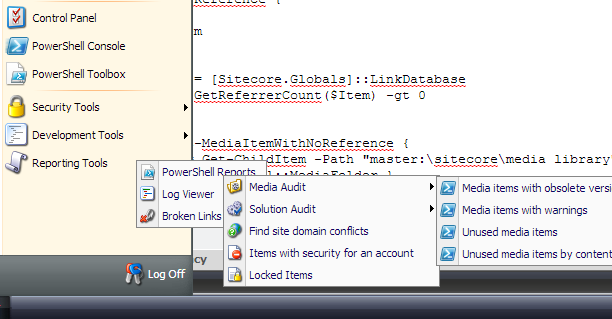
Here’s a quick example of where the new scripts appear within the Sitecore tree.
As you can see, SPE provides a reports folder where you can add scripts that will appear under Reporting Tools > PowerShell Reports.
I selected the Unused media items script which produced the following results:
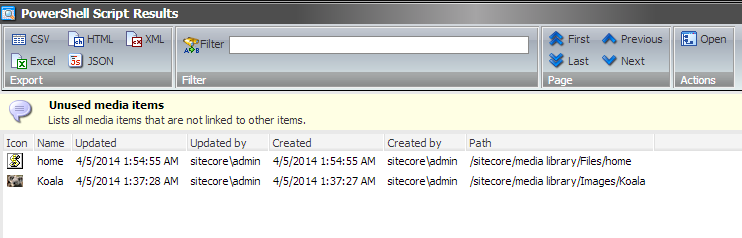
The above window is produced by using the “Show-ListView” command.
<#
    .SYNOPSIS
        Lists all media items that are not linked to other items.

    .NOTES
        Michael West
#>

# HasReference determines if the specified item is referenced by any other item.
function HasReference {
    param(
        $Item
    )

    $linkDb = [Sitecore.Globals]::LinkDatabase
    $linkDb.GetReferrerCount($Item) -gt 0
}

<#
    Get-MediaItemWithNoReference gets all the items in the media library
    and checks to see if they have references. Each item that does not
    have a reference is passed down the PowerShell pipeline.
#>
function Get-MediaItemWithNoReference {
    $items = Get-ChildItem -Path "master:\sitecore\media library" -Recurse |
        Where-Object { $_.TemplateID -ne [Sitecore.TemplateIDs]::MediaFolder }

    foreach($item in $items) {
        if(!(HasReference($item))) {
            $item
        }
    }
}

# Setup a hashtable to make a more readable script.
$props = @{
    InfoTitle = "Unused media items"
    InfoDescription = "Lists all media items that are not linked to other items."
    PageSize = 25
}

# Passing a hashtable to a command is called splatting. Call Show-ListView to produce
# a table with the results.
Get-MediaItemWithNoReference |
    Show-ListView @props -Property @{Label="Name"; Expression={$_.DisplayName} },
        @{Label="Updated"; Expression={$_.__Updated} },
        @{Label="Updated by"; Expression={$_."__Updated by"} },
        @{Label="Created"; Expression={$_.__Created} },
        @{Label="Created by"; Expression={$_."__Created by"} },
        @{Label="Path"; Expression={$_.ItemPath} }

Close-Window