SPE Workflow Action using Slack Notifications
Originally published on michaellwest.blogspot.com
Have you ever wondered how to notify a user about workflow changes to an item in Sitecore, but not through email? In this post I’ll show you in a few steps how to send notifications to a user or channel in Slack when transitioning an item’s workflow state in Sitecore.
TL;DR;
- Setup a Slack authentication token here. The documentation indicates there are some newer ways to acquire a token, but for now we’ll go with the low effort approach.
- Setup the PSSlack module for PowerShell found here. Optionally, run Install-Module PSSlack from an elevated PowerShell console. Big thanks to @pscookiemonster for putting this together.
- Create a SPE workflow action like described here.
- Update the script to send messages to Slack.
- Celebrate!
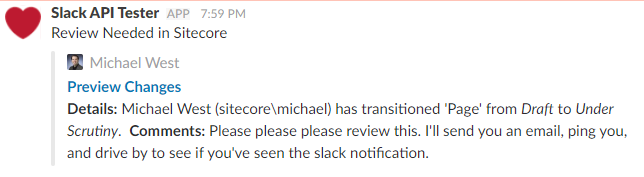
Example Notification
Getting Started
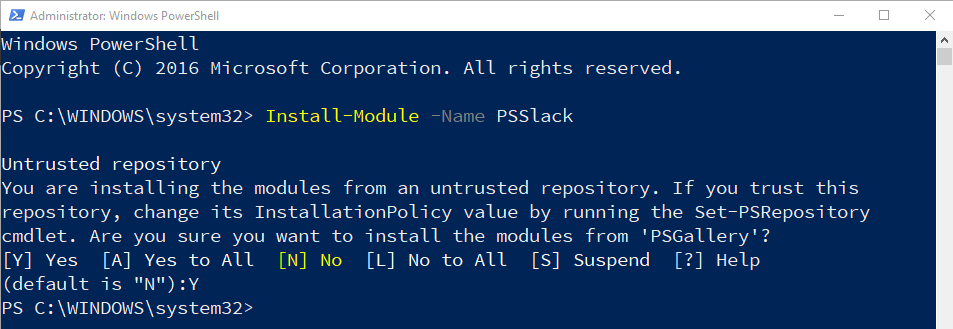
Install the PSSlack module.
Create a new PowerShell script in Sitecore. Here I created one for Slack and another for email.
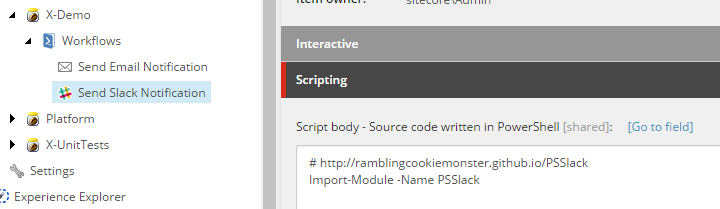
Write the necessary code to post into Slack
$workflowEvent = $SitecoreContextItem | Get-ItemWorkflowEvent | Select-Object -Last 1
$previousState = Get-Item -Path "master:" -ID $workflowEvent.OldState
$currentState = Get-Item -Path "master:" -ID $workflowEvent.NewState
$user = Get-User -Id $workflowEvent.User
$subject = "Review Needed in Sitecore"
$message = @"
<strong>Details:</strong><br/>
$($user.Profile.FullName) ($($user.Name)) has transitioned '$($SitecoreContextItem.DisplayName)' from <i>$($previousState.Name)</i> to <i>$($currentState.Name)</i>.
"@
if($workflowEvent.CommentFields -and ($comments = $workflowEvent.CommentFields["Comments"])) {
$message += "<br/><br/><strong>Comments:</strong><br/>$($comments)"
}
$id = $SitecoreContextItem.ID.ToString().ToUpper()
$language = $SitecoreContextItem.Language.Name
$editUrl = "https://test.dev.local/sitecore/shell/sitecore/content/Applications/Content Editor.aspx?id=$($id)&la=$($language)&fo=$($id)"
$previewUrl = "https://test.dev.local/?sc_itemid=$($id)&sc_mode=preview&sc_lang=$($language)"
$message += "<br/><br/><a href='$($editUrl)'>Edit Item</a>"
$message += "<br/><br/><a href='$($previewUrl)'>Preview Item</a>"
Send-MailMessage -To test@test.com -From here@here.com -Subject $subject -SmtpServer localhost -Body $message -BodyAsHtml
Close-Window# http://ramblingcookiemonster.github.io/PSSlack
Import-Module -Name PSSlack
$token = "[REPLACE_TOKEN]"
$workflowEvent = $SitecoreContextItem | Get-ItemWorkflowEvent | Select-Object -Last 1
$previousState = Get-Item -Path "master:" -ID $workflowEvent.OldState
$currentState = Get-Item -Path "master:" -ID $workflowEvent.NewState
$user = Get-User -Id $workflowEvent.User
$subject = "Review Needed in Sitecore"
$message = "*Details:*\n$($user.Profile.FullName) ($($user.Name)) has transitioned '$($SitecoreContextItem.DisplayName)' from _$($previousState.Name)_ to _$($currentState.Name)_."
if($workflowEvent.CommentFields -and ($comments = $workflowEvent.CommentFields["Comments"])) {
$message += "\n\n*Comments:*\n$($comments)"
}
$id = $SitecoreContextItem.ID.ToString().ToUpper()
$language = $SitecoreContextItem.Language.Name
$editUrl = "https://[REPLACE_SITECORE_URL]/sitecore/shell/sitecore/content/Applications/Content Editor.aspx?id=$($id)&la=$($language)&fo=$($id)"
$previewUrl = "https://[REPLACE_SITECORE_URL]/?sc_itemid=$($id)&sc_mode=preview&sc_lang=$($language)"
New-SlackMessageAttachment -Color $([System.Drawing.Color]::Blue) `
-Title "Preview Changes" `
-TitleLink $previewUrl `
-Text $message `
-Pretext $subject `
-AuthorName ($user.Profile.FullName) `
-AuthorIcon "[REPLACE_AVATAR_URL]" `
-Fallback "Please review and approve the changes at your earliest convenience." `
-MarkdownFields "text" |
New-SlackMessage -Channel '[REPLACE_CHANNEL_NAME]' -IconEmoji :heart: | Send-SlackMessage -Token $token
Close-WindowConfigure Workflow Action
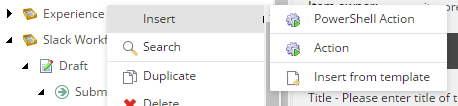
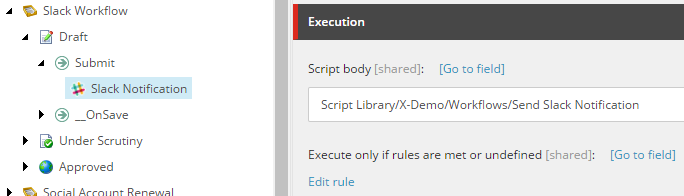
That’s it!
I hope you found this helpful. Feel free to reach out in the Slack channel #module-spe for help with the SPE module or just to say thanks. If you haven’t already, signup here.
Also, check out this post on when to choose Sitecore Slack and Sitecore Stack Exchange.