
SXA Search Endpoint Validation
Originally published on michaellwest.blogspot.com
Today we look at a noisy problem that shows up in security scan windows — invalid requests hammering SXA search endpoints and flooding your logs with exceptions.
Background
Our team regularly reviews web application scanning reports and aggregates log messages in tools like Elastic or Splunk. During a scan window, we noticed hundreds of exceptions being generated by requests to //sxa/search/results and //sxa/search/facets with malformed query strings — things like ?abc123 or ?l=abc123.
Sitecore acknowledged this as a bug (reference 589620) affecting SXA through version 10.3. Until a proper fix ships, you need to handle it yourself.
Option 1: Logging filters (interim)
If you want a quick fix that just kills the noise without blocking traffic, add a log4net StringMatchFilter to suppress the specific exception string from the LogFileAppender. Drop this config patch into your App_Config/Include folder:
<?xml version="1.0" encoding="UTF-8"?>
<configuration xmlns:patch="http://www.sitecore.net/xmlconfig/">
  <sitecore>
    <log4net>
      <appender name="LogFileAppender" type="log4net.Appender.RollingFileAppender, Sitecore.Logging">
        <filter type="log4net.Filter.StringMatchFilter">
          <stringToMatch value="Results endpoint exception" />
          <acceptOnMatch value="false" />
        </filter>
      </appender>
    </log4net>
  </sitecore>
</configuration>
Gist: gist.github.com/michaellwest/be74798d06477d1f0151c27916520f87
This stops the log spam but doesn’t actually reject the bad requests. You’re hiding symptoms rather than treating the cause.
Option 2: Block at the WAF (preferred)
The better approach is to block abusive traffic at the perimeter using your CDN or reverse proxy’s Web Application Firewall rules. Since we’re already behind Cloudflare, this was the natural choice.
The rules we implemented target only the /sxa/search/ path and validate that:
- The
l(language) parameter matches an expected format such asen-US— a two-letter language code optionally followed by a region - POST requests to search endpoints are blocked outright
- Query strings containing values like
pingor other probe payloads are rejected
(http.request.uri.path contains "/sxa/search/") and
(not http.request.uri.query matches "^l=[a-zA-Z]{2}(-[a-zA-Z]{2})?(&|$)")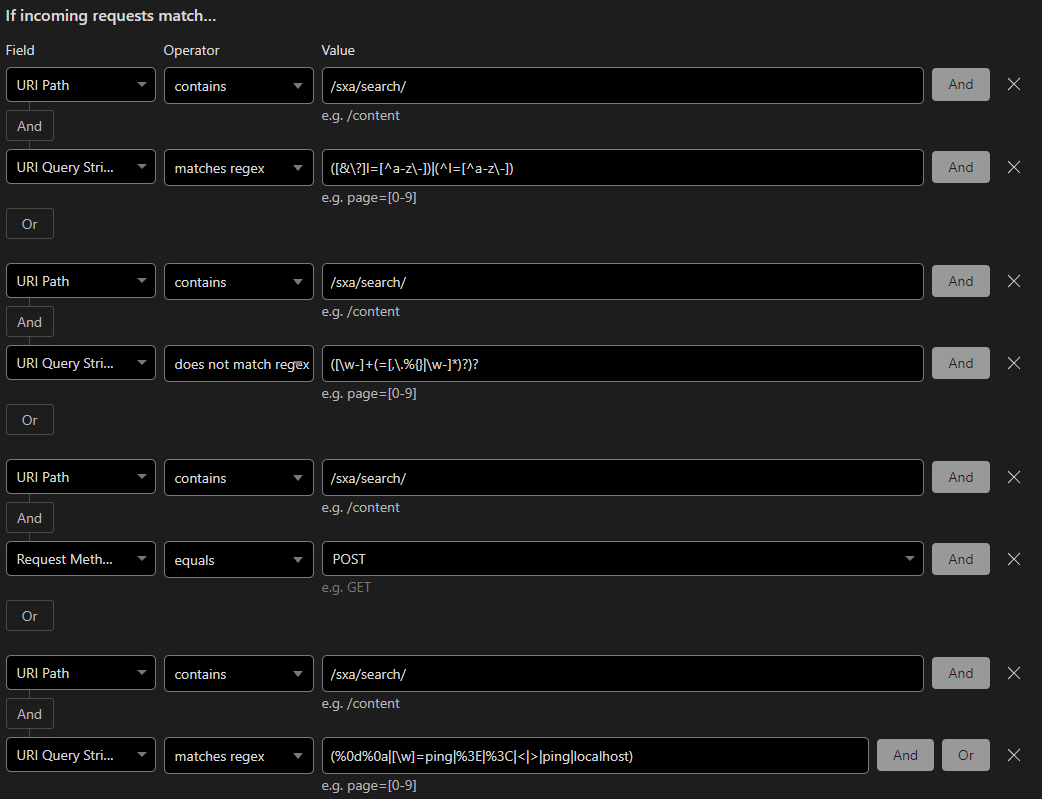
Block, not just challenge. These aren’t real users.
Takeaway
Your CDN WAF is your first and best line of defense for this kind of garbage traffic. Don’t wait for Sitecore to fix a logging bug — handle it at the edge and keep your logs clean for the signals that actually matter.