Working with Unicorn and Sitecore CLI
Originally published on michaellwest.blogspot.com
Today we explore what happens when you try to run Unicorn and Sitecore CLI at the same time during a staged migration.
Our team can’t make a complete switch from Unicorn to Sitecore CLI all at once. The goal was to incrementally adopt the IAR (Items as Resources) plugin to speed up deployments — a folder of 40,000 Unicorn items can take upwards of 30 minutes to zip, clean, extract, and sync on destination servers. Deployment nights were exhausting. We wanted something better.
The CLI commands we use to generate IAR packages from the serialized content look like this:
dotnet sitecore itemres create -o _out/scms -i Scms.* --overwrite
dotnet sitecore itemres unicorn -o _out/scms -p "../Serialization" --overwrite
What we didn’t anticipate were the compatibility issues when the two tools share the same items.
Problem 1: YAML compatibility
Gist: gist.github.com/michaellwest/e793aa1ba27c119396b069ec32404459
When Sitecore CLI serializes items that Unicorn previously owned, certain fields disappear from the YAML output.
Missing database names. Unicorn includes the database name in serialized fields. Sitecore CLI omits it. When Unicorn tries to sync those CLI-serialized files, it may fail or behave unexpectedly because it can’t determine which database the field belongs to. A Unicorn-generated file looks like this:
---
ID: "9c7e7d60-bfa0-4fec-b55c-462b3efdd545"
Parent: "839b77db-6040-4f00-8751-8e96fd37aba2"
Template: "854ba861-63ea-4a0c-8c7b-541e9a7ec4c1"
Path: /sitecore/system/Settings/Foundation/Scms/Search/Search Query Rules Context/Tags/Default
DB: master
Multilist field delimiters. Unicorn represents Multilist fields with a specific type identifier and pipe-delimited values. Sitecore CLI drops the type identifier, which means Unicorn syncs the field without the proper delimiter format:
SharedFields:
- ID: "42f77151-098f-496a-94cf-590b7edeeabe"
  Hint: Tags
  Type: Multilist
  Value: |
    {B5BAE47B-7C89-46AE-A367-B3F5027E8D18}
    {83E58187-D1E5-4FB8-953E-EE89816EC0B5}
    {D8933FCB-48F3-468E-8FB6-8F2B5CFAF404}
The workaround is tedious: track which fields are affected and manually restore the missing values after CLI serialization.
Problem 2: Language versions
The __Revision field. Most Unicorn installations exclude system fields like __Revision from serialization. This causes a problem with the Sitecore Publishing Service — when __Revision is absent from a serialized item, the publishing service may incorrectly delete the item during a publish.
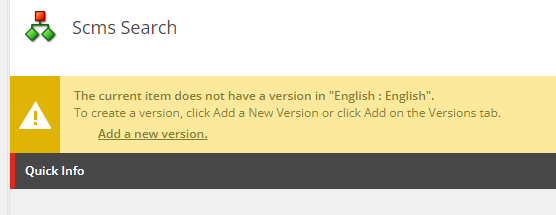
SXA and SPE now include __Revision in their IAR files for exactly this reason.
Empty language versions. Some Unicorn-generated files have language version sections with no fields listed:
- Language: en
  Versions:
  - Version: 1
When combined with an excludedFields list in sitecore.json, those items end up with no fields at all under a given language — effectively losing the language version entirely. No fields equals no language version. No language version equals a broken Sitecore Publishing Service.
Here is an example sitecore.json configuration that excludes fields and produces this issue:
{
  "serialization": {
    "excludedFields": [
      { "fieldId": "badd9cf9-53e0-4d0c-bcc0-2d784c282f6a", "description": "__Updated by" },
      { "fieldId": "d9cf14b1-fa16-4ba6-9288-e8a174d4d522", "description": "__Updated" },
      { "fieldId": "5dd74568-4d4b-44c1-b513-0af5f4cda34f", "description": "__Created by" },
      { "fieldId": "25bed78c-4957-4165-998a-ca1b52f67497", "description": "__Created" },
      { "fieldId": "{52807595-0F8F-4B20-8D2A-CB71D28C6103}", "description": "__Owner" },
      { "fieldId": "{001DD393-96C5-490B-924A-B0F25CD9EFD8}", "description": "__Lock" }
    ]
  }
}
The fix for both: update Unicorn.config to serialize __Revision, then reserialize all your content. There is an open issue requesting altered patching behavior in Unicorn to address this. Until then, you may need to manually comment out the relevant exclusion line in Unicorn.config.
How to fix it: reserialize with SPE
Gist: gist.github.com/michaellwest/203d113e48470b6ebec781871dd25e7c
Once you’ve updated Unicorn.config to include __Revision, you need to reserialize the affected items. This SPE script processes a list of content paths and calls Export-UnicornItem on each one:
$lines = @"
/sitecore/content/home
"@

$paths = $lines.Split([Environment]::NewLine, [StringSplitOptions]::RemoveEmptyEntries)

foreach ($path in $paths) {
    Get-Item -Path ($path.Replace("/sitecore", "master:")) | Export-UnicornItem
}
Add your affected paths to the here-string and run it from the SPE console. For 40,000 items this takes a while — run it off-hours.
How to find the damage
An SPE report works well for identifying items that have language versions in the content tree but no fields in their serialized representation. Query against your serialized root paths and flag anything where a language version section exists but contains no field entries.
Takeaway
Using Unicorn and Sitecore CLI together is possible but requires careful attention to what each tool includes and excludes in its YAML output. Before you start a phased migration, audit the fields both tools write and make sure the overlap is intentional.